Case Study
Calculating Square Roots in C#
A dive into learning C# and finding the most efficient way to calculate squart roots.
Related Project
KitKat Advertisement
May 2024A dive into learning C# and finding the most efficient way to calculate squart roots.
View projectProject Overview
What this project is
As a Unity developer, I was acustom to using C# inside the Unity Editor. However, over time I noticed the lines had become blurred between what is a function of the C# library, and what was a function of the Unity library.
After watching a couple of videos on youtube of others trying this problem in python and other programming languages, I saw it as an opporunity for me to focus purley on C# and see how far I could go.
This was not about fancy UI or animations. It was about developing my fundimental knowledge of C#, and a look into how to optimise code to run as efficiently as possible.
Problem
The challenge
The C# math library includes a function that calculates the square root of a number. Using that as a comparrison, with only C# I want to calculate the square root of a number using my own function whilst trying to make it as efficient as possible.
Approach
Brute Force Technique
The brute force technique is the most straight forward approach in order to calculate the square root. We simply start with our guess at 1, and keep increasing our guess until we find the square root.
Whilst this approach did work, and had consistent accuracy. It's overall preformance was terrible.
This is where optimisation starts to play a huge role in preformance. This technique is O(n²) which means as we increase our input, the result becomes exponentially longer to calculate.
Code
// BRUTE-FORCE
// From 1 interatively add {step} until you find SQRT. Only accurate to {step} decimals

static double Sqrt_BruteForce(double count, double step = 0.1)
{
    double guess = 1;

    while (guess * guess < count)
    {
        guess += step;
    }

    return guess;
}
Research
What does O(n) mean?
Big-O notation describes how the amount of work an algorithm does grows as the input size increases. Instead of measuring exact time, it focuses on the rate of growth. The letter “O” means “order of growth,” and the expression inside the brackets describes how the number of operations increases as the input size n gets larger. For example, O(n) means the work grows linearly with the number of items, so double the data and the work roughly doubles. O(log n) grows much more slowly; each step greatly reduces the remaining problem, so even very large inputs stay manageable. O(n²) grows much faster because every item is compared with every other item, meaning that if the input doubles, the work becomes about four times larger. Big-O notation is useful because it lets programmers compare algorithms based on how well they scale with large data, regardless of the exact computer they run on.
Approach
Binary Search Technique
The binary search technique is a much more efficient way to calculate a square root. Instead of increasing our guess one value at a time, we repeatedly split the possible range in half to narrow down where the correct value must be. We start with a range between a low value and a high value. Then we take the midpoint of that range and square it. If the result is higher than the number we are trying to square-root, we know the answer must be in the lower half of the range, so we remove the upper half. If the result is lower, we remove the lower half instead. By repeating this process, the range containing the correct answer becomes smaller and smaller until we reach a sufficiently accurate result.
This approach is significantly faster than brute force because it eliminates half of the remaining possibilities every step rather than checking values one by one. Its time complexity is O(log n), meaning the number of steps increases very slowly even as the input becomes very large. In practice, this means we can reach a highly accurate approximation of the square root in only a small number of iterations.
Code
// BINARY SEARCH
// Half N and then ^2. If higher than N remove bottom half of list, if lower remove top half.

static double Sqrt_Binary(double count, int interations = 20)
{
    double low = 0;
    double high = (count >= 1) ? count : 1;
    double mid = 0;

    for (int i = 0; i < iterations; i++)
    {
        mid = (low + high) * 0.5;
        double sq = mid * mid;

        if (sq > count) high = mid;
        else low = mid;
    }

    return mid;
}
Research
Why use double instead of integer?
Talk abour it.
Approach
Newton's Technique
The binary search technique is a much more efficient way to calculate a square root. Instead of increasing our guess one value at a time, we repeatedly split the possible range in half to narrow down where the correct value must be. We start with a range between a low value and a high value. Then we take the midpoint of that range and square it. If the result is higher than the number we are trying to square-root, we know the answer must be in the lower half of the range, so we remove the upper half. If the result is lower, we remove the lower half instead. By repeating this process, the range containing the correct answer becomes smaller and smaller until we reach a sufficiently accurate result.
Code
// NEWTON
// Divide N by guess. Then add the result to guess. Multiply the outcome by 0.5.

static double Sqrt_Newton(double count, int iterations = 10)
{
    double guess = count * 0.5;

    for (int i = 0; i < iterations; i++)
    {
        guess = 0.5 * (guess + count / guess);
    }

    return guess;
}
Research
How are doubles stored?
Talk abour it.
Approach
Bit Shift Technique
The binary search technique is a much more efficient way to calculate a square root. Instead of increasing our guess one value at a time, we repeatedly split the possible range in half to narrow down where the correct value must be. We start with a range between a low value and a high value. Then we take the midpoint of that range and square it. If the result is higher than the number we are trying to square-root, we know the answer must be in the lower half of the range, so we remove the upper half. If the result is lower, we remove the lower half instead. By repeating this process, the range containing the correct answer becomes smaller and smaller until we reach a sufficiently accurate result.
Code
//BIT SHIFT
// Preform a bit shift operation to half the exponent providing an immediate accurate guess.

static double Sqrt_BitShift(double count)
{
    long bits = BitConverter.DoubleToInt64Bits(count);
    bits = (bits >> 1) + 0x1ff8000000000000L;
    double guess = BitConverter.Int64BitsToDouble(bits);

    guess = 0.5 * (guess + count / guess);
    guess = 0.5 * (guess + count / guess);
    guess = 0.5 * (guess + count / guess);

    return guess;
}
Gallery
Results
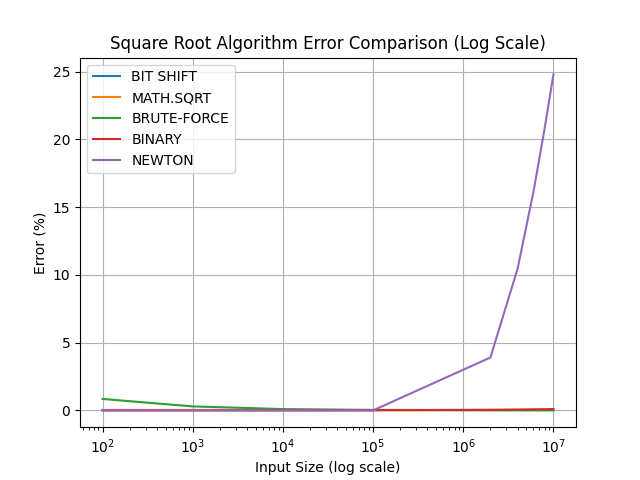
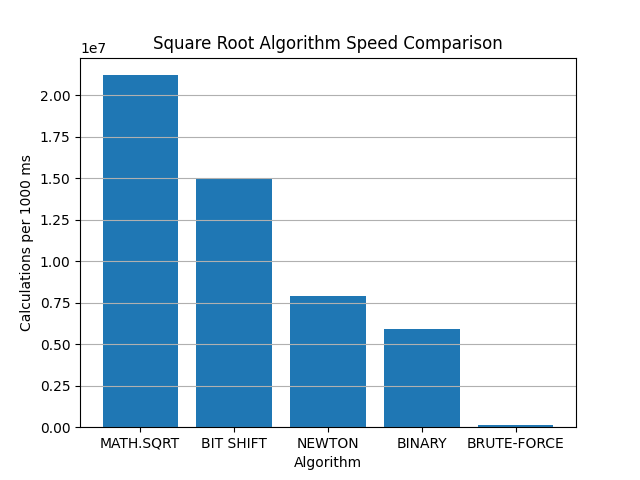

Technical Notes
Challenges and what I learned
Talk about the hardest parts, what changed during development, what trade-offs you made, and what you would improve next.
Citation
Reference this work
Harvard
(Robb, 2026)
Robb, S. (2026) Calculating Square Roots in C#. Independent technical research.
APA
(Robb, 2026)
Robb, S. (2026). Calculating Square Roots in C#. Independent research paper.
MLA
(Robb)
Robb, Scott. Calculating Square Roots in C#. 2026.
References